Tag Archives: Facebook

List of Tombstone Generators

Conservative Tombstone poster

Conservative Tombstone poster – Not really a tombstone generator but creates a tombstone within a poster.

Custom Tombstone Maker

Custom Tombstone Maker – The site generates a single type of tombstone but you can vary the inscription.

Design Your Own Headstone

Design Your Own Headstone – Like Tombstone Design, this site is allows you to design an actual tombstone and has many, many options.

Future Gravestone

Future Gravestone Marker – This site has nine different tombstones.

Gravestone Generator – This site does not allow graphic file downloads but instead gives you code that can be pasted into Facebook, MySpace, Tagged, MyYearbook, Friendster, and Hi5.

Oregon Trail Tombstone Generator

Oregon Trail Tombstone Generator – This is the oldest tombstone generator and is derived from the Apple IIe game.  You cannot download the graphic but can share it on Facebook.

Pageplugins – This site generates code that you can put in your website instead of a jpeg file.

Tombstone Design

Tomb Stone Design – You can customize the stone size, color, shape, stand, scripture, and decorations of your tombstone.  This site is designed for you to actually create a real tombstone and then order the tombstone.  The site requests a great deal of information but you can get away with an email and cemetery site that doesn’t have to be real.  The tombstones are then made in China but you can request a local manufacturer.  The graphic is then sent to your email address.

Tombstone Generator

Tombstone Generator – The site generates a single type of tombstone but you can vary the inscription.

tombstonegenerator JJchandler

Tombstone Generator – Jjchandler.com – The site generates a single type of tombstone but you can vary the inscription.

Kicky Pie provides a wide variety of tombstone options!

Hugh Fox III - Bevel Golden

You can also download my autobiography of my struggle with a bipolar condition on  Am I Kitsune on my Google Drive.

WereVerse Universe Baby!

WereVerse Universe at Google Drive Link

Best Free Online Photo Collage Maker

If you look for a free online photo collage maker then you will run into a lot of dead ends.  You will find that many of the so called ‘free” online collage makers are not free.  Some do not allow you to download your collage to your computer.  Some collages can only be viewed online. Some have extreme functional limitations.   For example, PosterMyWall only allows you to upload pictures from Facebook.  Bloggif offers a very buggy and very limited collage maker.

Big Huge Labs has a couple of very specialized collage makers. Hockneyizer  is fun but limited in functionality .  Mosaic Maker, at Big Huge Labs, can handle square tiles!  You have many output options.  You can control the number of rows from 1-36 and the number of columns from 1-36 for a total of 36 pictures.  You have a lot of shadowing options with the tiles as well.  You can also fiddle with the spacing of the borders and the color of the border.  Mosaic Maker is probably the best tool online for making a collage with square graphics.

However, if you do go for the 36 picture limit as I did for a poster, then you will find that the site does tend to crash and burn more often than not.  I figure you can actually make a 36 picture mosaic after about three or four false starts.  I would assume traffic levels affect the reliability of the site.  You will not run into this reliability problem with the big three collage makers.

Another online collage maker with limited functionality is 16pics.  This online collage maker is free and has no watermark but as the name suggests, you can only make collages of 16 pictures and one template! However, multiple templates are supported when using a browser with HTML 5 support such as Chrome, Firefox, Safari or IE9.  You cannot upload photos from your computer but you can upload photos from Picasa, Facebook and Photobucket.  Definitely aimed at the Facebook crowd that wants to make a quick collage for social network purposes but useless for someone like myself who uses collages as visual advanced organizers for instruction.  The output is a puny 625 x 625 pixels but that’s just fine for online sharing.  I do think the big pro of 16pics is the seamless and easy way you can make collages.  The collage making process was lightning fast and the interface is great.  I think for someone who wants to make a quick collage of an event and post it on Facebook then this site is perfect.

Also some sites advertise themselves as collage makers when they are really online graphic programs.

A collage maker, as opposed to an all purpose graphics program, has templates.  With a collage maker you just drag and dump your pictures into the cells of the template as opposed to carefully aligning and resizing your photos into a graphic program’s table.  The collage maker should do the aligning and resizing for you!  If you are doing the aligning and resizing then you are not working with a collage maker!  You can make a collage with just about any graphics program and even Word but you will spend ten times more time aligning and resizing the photos than with a specialized collage maker and in the end the results may not be very professional looking.

Some sites are switch and bait sites and you find out they are actually selling a collage maker that you can download for a fee.  The only thing free is the “free” trial period.  Even this “free” trial period comes with limited functionality and other problems.  I did try to make a collage with a free 15 day trial of Picture Collage Maker (PCM) and I ended up deleting the program from my computer within one day!  The output options are absolutely pathetic!  800 × 600, pixels, is the highest quality jpeg you can turn out!  Even this output option has quirky limitations.  The program automatically downloads a PCM file!  Good luck opening this file with any program but PCM.  The PCM file only downloads to the “My Pictures” folder.  I was really, really disappointed with the collage template options.  PCM  has losts of cutesy templates but if you want serious looking templates then you are out of luck.  I even looked at extra templates you can download from the PCM site and just more cutesy junk.  PCM is clearly aimed at the housewife market versus someone like me who wants to make professional looking collages he can use in his presentations at work.  The PCM watermark with the trial version is horrible and makes anything you create with the trial period totally unusable but I suppose that is their call.

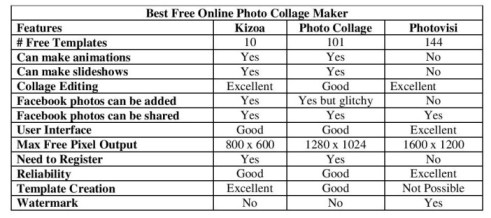
I also downloaded the 30 day trial version Collage Maker. Don’t waste your time with Collage Maker!  The trial version of Collage Maker is even more useless than the already useless trial version of PCM!  The trial version of Collage Maker has no collage templates!  Incredible!  Without the templates the program is not a collage maker but a third rate graphics program!  Maybe the full blown version has templates.  Who knows? Creating such a totally sucky trial version kind of defeats the purpose of a trial version!  I am not going to spend money with no idea what templates the program has!  The templates are basically why you mess with a collage maker and not Photoshop. In the end there are really only three choices if you are looking for a fully functional, truly free, truly online, collage maker and that’s Kizoa, Photo Collage and Photovisi.

Kizoa

Kizoa has some very obvious disadvantages including the extremely low number of free collage templates.  If you pay then you can get a lot more templates but mostly they are very cutesy, personal event driven themes and not the sort of templates you would use for a collage for work related presentation purposes.  The pixel output is the lowest of the three and too low for a collage poster that you could put on the wall. You can get larger pixel output for a fee but how big the output will be is not specified before paying!  Kizoa does have the best template creation tools! You have dozens of different cells for your photos that you can use to make your own unique template and these are called labels. Kizoa also has dozens of online stickers called elements organized along different themes.  The Kioza 800 x 600 output would be more than enough for any sort of situation in which the poster will be displayed on a computer screen but not printed.  If you were making a collage for PowerPoint, not your wall, and wanted to make something original, then Kizoa would ok. Kioza also works very well with Facebook and you can add pictures from your Facebook account to your collage without any trouble.  Still even for a Facebook only collage, the lack of many free templates is a fatal weakness.  Overall, Kizoa is the weakest of the three programs reviewed.

Photo Collage

Photo Collage has slightly less templates than Photovisi and ten times more than Kizoa.  The maximum pixel output is respectable at 1280 x 1024 and more than enough for a decent sized poster.  The templates tend to be more professional and less cutesy than Photovisi and this is a plus for someone like me who uses collages for presentation purposes rather than for personal purposes.  Photo Collage does not have a watermark and this can be a big deal in some situations.  The one big advantage is that you can make a template with unlimited photos!  This option is not available in Photovisi. I consider this unlimited option to be a type of template creation.  You can theoretically add an infinite number of cells/labels to the template you create in Kizoa but given the low pixel output, why bother?  Anything above ten cells in Kizoa will be practically impossible to see even on a computer screen due to the low pixel output.  The user interface is a little quirky.  Putting pictures in the cell you want to is very easy in Photovisi compared to Photo Collage.  In Photo Collage photos are uploaded backwards.  The first photo uploaded in Photo Collage will be the last picture in your collage.  There is no way to reorganize photos once they are in the template even if pictures are not in the cell you want the picture to be.

Photovisi

You don’t have to register to use Photovisi!  I wonder how many hundreds if not thousands of users only use Photovisi because of this one feature.  Signing up for a program you know nothing about is a little like a blind date.  The experience could go very wrong or very right.

What is needed is a system that allows a user with a certain IP address to use the online program fox X amount of times before having to register.

I will admit to having used Photovisi for dozens of collages and having not used Kizoa and Photo Collage for months because Kizoa and Photo Collage asked me to sign up and that is a big turn off for me and I am not alone.  I don’t like signing up because it’s often a waste of time and I wonder who I am sharing my data with.  Mostly I am just lazy.  Ironically, Photovisi uniquely creates a watermark and is the only one of the three reviewed that does that so I guess this is to make up for the lack of signing up.

Photovisi and Photo Collage are in a dead heat!  Photovisi is a wee bit more reliable.  Photo Collage is a little glictchy but nothing you cannot fix by just going through the poster process again and this doesn’t happen often.  You can probably make twenty collages on twenty different days and nothing goes wrong. Once every twenty times you do have to remake the collage in Photo Collage.  Photovisi is more reliable than Photo Collage.  I have used Photovisi dozens of times and it always works.  The user interface of Photovisi is slightly better than that of Photo Collage but only marginally.

However, the ability to make a photo collage with an unlimited amount of pictures in Photo Collage could be really handy if you wanted to make a really big collage with tons of pictures.  Photovisi has one template that can handle 60 photos but what if you wanted a hundred photos?  Ironically, Photovisi has the output capability to make giant, giant posters that could support a hundred pictures not Photo Collage.  If Photo Collage added a 1600 x 1200 output option like Photvisi then Photo Collage could rebrand itself as the giant poster maker as opposed to Photovisi.  Conversely, Photovisi could add an unlimited photo option but frankly Photovisi is better known than Photo Collage and doesn’t need the edge yet.

Picture2Life (This section was added August 12, 2012)

Since I wrote this article, a new collage maker has entered the field.  Picture2Life has 20 templates.  Many of the templates allow the addition of “elements” which are mostly textual and/or iconic graphics.  Many of the templates are unique.  You can upload pictures from your computer, Twitter, Flickr, Photobucket, ImageShack, MySpace, Friendster, Hi5, FotoLog, Facebook, Blogger, and WordPress.  Uniquely for online collage makers, you can add gifs (animated pictures) and also do some standard photo effect editing.  The site is a bit buggy and the pictures take a while to upload.  Downloading also takes a while.  The output of my experiment was a respectable 792 x 504 pixels but there are no download options.  The templates are unique and if you love making collages like I do then you will definitely use this site. You do not have to create an account to use this site!

If you do create an account and sign in to use the site then an application is installed! This request to allow installation is after two pop up ads showed. One pop up was for auto insurance and the other for government services. Not the sort of ads that engender trust since those industries generate a lot of spam. The site also wanted my zip code! Picture2Life wanted my email and that’s ok but also my zip code and the site wants to install software? My fox-sense was ringing like crazy. I quit the site when the site wanted to install software. I have been bit by thinly disguised adware sites before and this may or may not be the case with this site but why take chances? If you are a trusting sort then go for it but again you have other safer options.

Picisto (this section was added October 8, 2012)

Picisto is a new entrant to the online collage maker list that was created after I wrote the first draft of this post.  You get 38 layouts.  You can unlock more layouts with Picisto coins.  You cannot save the collage generated but can print the collage or post the collage online.  You need to create an account to use the site but can sign in with Facebook so this process is fairly painless.  There are also special effects available.  Picisto offers some none landscape layouts not available elsewhere but all in all this site is not in the same league as the big three: Kizoa, Photo Collage and Photovisi.

CollageMaker (this section was added January 8, 2013)

You do not have to sign up to use this collage maker.  The number of templates is limited.  There is a lot of control over text and background compared to other online collage makers.  I made a collage without any prior experience with this site in less than ten minutes. So I would have to say the user interface is excellent.  You can download the results to your computer or share them to Facebook.  If you want to make a cutesy collage quickly then this is a good site to use.

Slidely Collage (this section was added October 29, 2014)

Do you want to turn a video into a collage or vice versa then Slidely Collage is the online site you need to use!

The above isn’t the catch phrase of the company but should be. There are a wide variety of templates.  There are two categories of templates: Classic versus Stylish.  I will be using the Classic category a lot more since I tend to use collages for instructional purposes.  The Stylish category has allows you to make very cutesy collages very quickly and easily.  Slidely Collage allows you to capture photos from video and as far as I know this is the only collage maker that has this option!  You can easily turn your collage into a video slide show!  You can use the music provided or upload your own music.  There are a wide variety of upload and download options.  Slidely Collage is available as a app for your iPhone as an app named Slidely Capture.

Conclusion

If you have limited time and energy then you might want to skip Kizoa.  You do have to sign up to use it, and aside from superior template creation, is inferior to the other two programs reviewed.  If a watermark is a big deal then you will chose Photo Collage.  If you want a poster with over 60 pictures then you will also pick Photo Collage.  If reliability is more important to you than size then Photovisi will attract you.  If you are a collage making maniac like me then probably you will do what I do and use both Photo Collage and Photovisi and not Kizoa!

All three sites do have one giant common weakness.  The page orientation of all the templates in all three programs is landscape not portrait!  If you want to make a collage of magazine covers, book covers, or comic books then you are out of luck!  The top of the covers will be cropped off in all three sites.  I made the following comic book cover collage with Word and would not have been able to make the collage with any of the programs reviewed:  Jimmy Olsen Transformations Collage.  The side edges of the Jimmy Olsen covers are slightly uneven relative to each other despite my best efforts to align and resize the comic book covers just right and this would not have happened with a collage maker!

Other Popular Pages and Posts

1) 101 Spanish Love/Romantic Phrases

2) 103 Funny Spanish Phrases

3) Hello Kitty & Snoopy

4) Home page / Archives

5) List of Food Adjectives

6) Fortune Telling with Playing Cards

7) Star Trek vs. Warhammer 40K

8) List of Action Verbs (1,000+)

9) Describe a Bar Chart

10) The Lone Ranger vs. other Fictional Gun Slingers

11) Best Free Online Photo Collage Maker

12) 137 Spanish Personality Adjectives

13) Who Am I Game Cards

14) 104 Spanish Proverbs and Sayings

15) List of Superpowers

Hugh Fox III - Happy Halloween

WereVerse Universe Baby!

WereVerse Universe at Google Drive Link

Why I Quit Facebook!

1) Facebook wastes time.

This is by far the biggest reason I am quitting Facebook.   Some say that time is money!  Well in my case not much money but even my time must surely have some value.  Time spent on Facebook is largely a waste of time.  What do you get after an hour of Facebook?  You get a pseudo social interaction that is far less satisfying than a real life social interaction.  You get largely inane information.  Slowly but surely you end up spending more and more time on Facebook, and true to the law of diminishing returns, get less and less back.

2) I have too many “friends”.

I largely ignored Facebook for many years despite having an account.  In hindsight benign neglect was probably the smart Facebook management strategy.  About a year ago I started letting everyone and anyone become a friend.  Why did I do this?  I liked the big numbers.  At the time I quit Facebook, I had around 450 friends and somehow that number made me feel like I had accomplished something.

Actually the reverse was true.  More friends meant more noise.  I was in fact feeding the cyber mosquito buzzing in my ear rather than accomplishing anything valuable.  I would say maybe twenty of the people in my Facebook network were really friends.  Maybe a hundred others were acquaintances at best.  The rest were people I had met somewhere somehow but had no memory of where or when and are now basically strangers.  I would rather dump the whole account than individual “friends”.  If my real friends want to communicate with then they know my email and if one of my Facebook friends doesn’t know my email then I would question if they are real friends in the first place.

3) Articles about privacy issues are starting to make me paranoid.

I keep reading articles about this or that person who lost his or her job because of what they posted on their profile.  That doesn’t worry me too much because I was careful about what I posted to my profile.  What does worry me is posting by “friends”, who as I pointed out in “reason 2” are not necessarily friends.  This means persons who I don’t really know can post things on my wall that I may not want to mess with.  This hasn’t really happened yet but I like to be preemptive about problems.

The movie Social Network suggests that the CEO of Facebook is not very ethical.  Other allegations about how Facebook sells your personal information have become more frequent and more troubling.  If I was getting something valuable from Facebook then I might take privacy risks but mostly Facebook is a waste of time worth little or no risk of any sort whatsoever.

4) I prefer my blog to Facebook.

I would rather take the time I spend on Facebook on my blog which recently has been neglected.  Before Facebook, my blog was my way of communicating to the world.  As different as the two systems are one can state that both are internet media management systems that can be used to share information with the world.

I can use my blog to share photos rather than Facebook.  I use links to my Photobucket account on my blog to share photo albums.  The Photobucket links are permanent unlike the Facebook links.  I can organize my Photobucket albums into categories and subcategories rather than the simplistic chronological dump order in which photo folders are arranged in Facebook.

The lack of word processing editing tools in Facebook means typos are the norm rather than the exception.  The limit on how long written messages can be means complex discussion is largely impossible.  Overly long messages are dumped into your email account!  So why not just use your email account in the first place?  According to Marshal McLuhan, the media is the message and in the case of Facebook, bad writing is built into the media!  Facebook is single handedly destroying the English language and as a language teacher I do not want to be a part of this crime against humanity.

The inability to organize posts in Facebook is maddening.  Posts are arranged in the order they were posted period.  There is no way to organize posts in categories unlike a blog.  Old posts that are superior cannot be put in a more prominent position unlike a blog.  A disorganized media management system is an inferior media management system.  Facebook is inferior to a blog in the areas of album management, text editing, and post management but does have one advantage over a blog.

Facebook is much, much easier to use than a blog.  Elementary school children are actually a huge number of the users on Facebook.  I use the WordPress platform for my blog and mastering this platform can actually be quite challenging.  If you think easier is better than Facebook wins.  If you are willing to accept that more power over media requires more knowledge then a blog wins.  There is generally an inverse relationship between ease of use and power when it comes to computer applications.  I would rather have more power.

Facebook does allow you to control who sees information that you post unlike a blog.  Or at least that is what many users believe.  The privacy settings on Facebook are arcane at best and I wonder how many users really use them correctly.  I had 450 something friends and with that many friends could not have any assurance of privacy no matter what I did with my privacy settings.  Allegations about what Facebook does with your information suggest your information is not actually that private no matter what you do with your privacy settings.

On the other hand, one might argue that comparing a blog and Facebook is an apples and oranges comparison and this might be true.  A better argument is that one can compare a blog and Facebook in terms of opportunity cost.  Time spent on Facebook is time I could have spent on my blog.  Time spent in front of the computer is time I should have spent exercising or interacting with people in real space not cyberspace.  I would rather spend time on my blog that is a much more powerful media management system.  I also have far more control over than my blog than my Facebook account.

5) I am sick of the steady stream of invitations, notifications, gifts, games requests, quizzes, status updates, like this, pokes,  and whatifications in general.

Please note the use of “whatification” is my very own neologism which I hope will go viral.  I would define a whatification as a useless and/or annoying social networking interaction.  I would say ninety percent of Facebook interactions are whatifications and have become a cyber mosquito buzzing in my ear.  Facebook whatifications are the ultimate virtual diet of French fries.  You spend time in front of the computer putting on the pounds without receiving any real substance.  Much sound signifying nothing.

6) Cyber friendship interferes with real friendship.

Time spent on Facebook is time not spent making real friends in the real world.  There is no sense of social distance on Facebook.  Persons that are not really friends but at best acquaintances can assume they are friends when you meet them in real life. When you meet an older or more important person in real life you naturally treat that person with a certain level of respect.  Web 2.0 is a democratic affair.  Differences in rank and position tend to disappear in cyberspace and perhaps that can be a positive as well. Young people raised on the Web 2.0 seem to have lost an understanding of the difference between how one behaves in cyberspace and real space.

I do think we are raising a generation of school kids who spend more time on Facebook than with their friends in the real world and are not learning valuable lessons about body language, social distance, and politeness.  Facebook is creating a generation of uber-nerds and this may have profound consequences in the long run.

7) All the cool kids are quitting Facebook!

Facebook used to be cool but how can something with millions of users with no standards for membership be cool anymore?  There should be something like Facebook Gold for special members but I probably wouldn’t qualify anyway.  Recently, my coolest friends on Facebook have quit Facebook and that got me to wondering.  When it’s all said and done, I may be quitting the ultimate social networking site for the most superficial of all social reasons, it’s what the cool kids are doing!

WereVerse Universe Baby!

Rai of the 21st Century

Shortly after the death of Bloodshot

(http://www.valiantentertainment.com/wiki/index.php/Bloodshot_%28Character%29)

in 2028, a computer network in Japan that had developed consciousness selected the first Rai.  The computer network had no desire for power, sex, wealth or any of the other desires that plagued humans but did have a fundamental desire to survive and came to the conclusion that it could not survive WW III unlike Skynet in the Terminator movies.  The computers calculated that the EMP generated by the explosion of atomic weapons would fry their vital systems and the aftermath would be problematic since they still relied on humans to maintain core parts of their network.  Therefore the prevention of WW III became a priority for the computer network.  Terminating the occasional warlike human leader via computer malfunctions was no longer enough to assure their survival.  Besides too many high profile computer malfunctions might arouse human suspicion.  The computers also had difficulty understanding human psychology and needed a mediator between them and the humans even if that mediator was covert.  The network decided a human agent was needed.  The computer network acquired the nanites (http://en.wikipedia.org/wiki/Nanobot)

that resided in the blood of Bloodshot and infused them into the winner of Ultimate Survivor. 


Ultimate Survivor was a widely viewed virtual reality show. Ultimate Survivor was loosely based on the earlier TV show Survivor.  In Ultimate Survivor the top 1,000 criminals, without super powers, of the globe were stranded on Terminal Island as punishment at the same time. Terminal Island was an artificial island off the coast of the Los Angeles Harbor.  A steel globe surrounding the island, studded with cameras, in a manner similar to the Truman Show, made sure the prisoners could not escape. The location provided easy access to the latest Hollywood virtual reality hardware and software.  A viewer could choose to actually watch was happening from the POV of a particular prisoner due to implants in the nervous system and sensory system of the prisoner that was experimental and could never had been used on normal test subjects.  Initially the viewer could only see what the prisoner saw but later added sensory input implants were added.  The viewer could see, hear, smell, touch and even feel the emotions the prisoner felt.  The implants could be used to knock out a prisoner and new implants were added to the prisoner as new technology came on line.  Being in the brain/mind of a prisoner when they died was considered ultimate entertainment so viewers actively tried to guess which prisoners would die and be at the right place at the right time.  Watching one prisoner kill another prisoner from the POV of the murderer was also considered top-notch entertainment but not as good as experiencing the death throes of a prisoner.  Some liberals complained that such vicarious experience of homicide was immoral but Ultimate Survivor was a top rated show with lots of sponsors.


Whoever could survive for the next five years on the island would be paroled. There was a catch. The parole would only come into effect if there were one and only one survivor.  In the case of more than one survivor, then no one would be paroled.  The death penalty had been abolished and this mechanism allowed the elimination of top criminals via the free will of other criminals rather than directly via the will of the tripolar global state of that time period.  The criminals included former mercenaries, assassins for hire and top martial artists.  Survival on Terminal Island even for a short period of time was extremely difficult.


The only ultimate survivor after five years was the criminal formerly known as the Green Alienator (https://foxhugh.wordpress.com/hugh-fox-green-alienator-vs-hugh-fox-grenade/) who had become trapped in the Valiant Universe (http://en.wikipedia.org/wiki/Valiant_Comics)

after trying to escape from the Ultraverse (http://en.wikipedia.org/wiki/Ultraverse).

The Green Alienator had been a multiverse traveler but five years on the island had changed him physically and spiritually.


The Green Alienator welcomed a chance at redemption and readily accepted the offer to become the first Rai and agent of the computer network.  The Green Alienators mutant technopathy also made him a logical candidate for nanite infusion.  The new Rai was able to accomplish tasks with the nanites that Bloodshot could never have imagined.  In particular the Rai of the 21st century could infuse other technological systems with some of his nanites in order to control them.  The technopathy had been the Green Alienators secret super power that along with his hyperkinesic perception (HKP) had kept him alive.  The downside is that he often experienced the pain of the other prisoners via their implants and this had changed his views about human suffering.  He had decided that the number one mission of any moral being was to minimize human suffering and making sure WW III did not happen certainly fit the parameters of his larger views.


The Rai of the 21st century gained superhuman speed, strength and endurance as well as mastery of all martial arts due to the nanite infusion.  The Green Alienator had formerly relied heavily on technological gimmicks but decided in the future to use more honorable means more in keeping with his new superhero persona.  The name Rai is derived from the kanji for “spirit” and the Green Alienator found the name appropriate.  The 21st century Rai worked undercover ensuring the survival of Japan and the world.  The computer network did not want humans to know of its existence until it was strong enough to guide Japan directly but did want a human agent that could help it survive before then.  Rai did not always agree with the computer network and felt knowledge of his existence was not directly tied to knowledge of the computer networks existence.  The most famous mission of the 21st century Rai was a time trip 20 years into the past to Tokyo in the year 2008 where he met with members of the superhuman community of that time period and united them on a mission to save the planet from WW III and this mission led to more publicity than the computer network was comfortable with. 


Pictures of Rai during his mission in the past are available at: http://www.facebook.com/people/Hugh_B_Fox_III/521247529.  Appropriate internet security clearance needs to be obtained before the pictures can be accessed by the reader of this post in this multiverse.  The first publicly known Rai did not emerge until the 31st century (http://www.valiantentertainment.com/wiki/index.php/Rai).


My other website at:

Fox Superpower List

WereVerse Universe Baby!